 Sport CRM
Reports and trends
The club's reports (attendance sheet, a year of trends, coaches, locations, payments, pay, leads), who sees which, and how to export one to Excel.
For: manager, owner, coach
Reports only show what is already in the club: marks, sessions, payments, leads. There is nothing extra to enter, and the better the attendance and payments are kept, the more the reports tell you.
Who can
All reports are under Reports. Each person sees their own tabs:
| Tab | Who sees it | Plan |
|---|---|---|
| Attendance sheet | all staff; a coach starts on their own team | any |
| Trends, Coaches, Locations | managers and up | any |
| Risk of quitting | managers and up | Club and up |
| Payments | the owner; support if allowed to see the finances | any |
| Pay | the owner and support with the finances; coaches if the owner allows | Club and up |
| Leads | everyone who works with leads | any |
The Attendance sheet is there only if the club keeps attendance.
Trends: the club over a year
Open Reports → Trends.
Choose the period: From, To and the Step (Weeks, Months or Years). Quicker: the 3 months, Year, Last year and 5 years buttons.
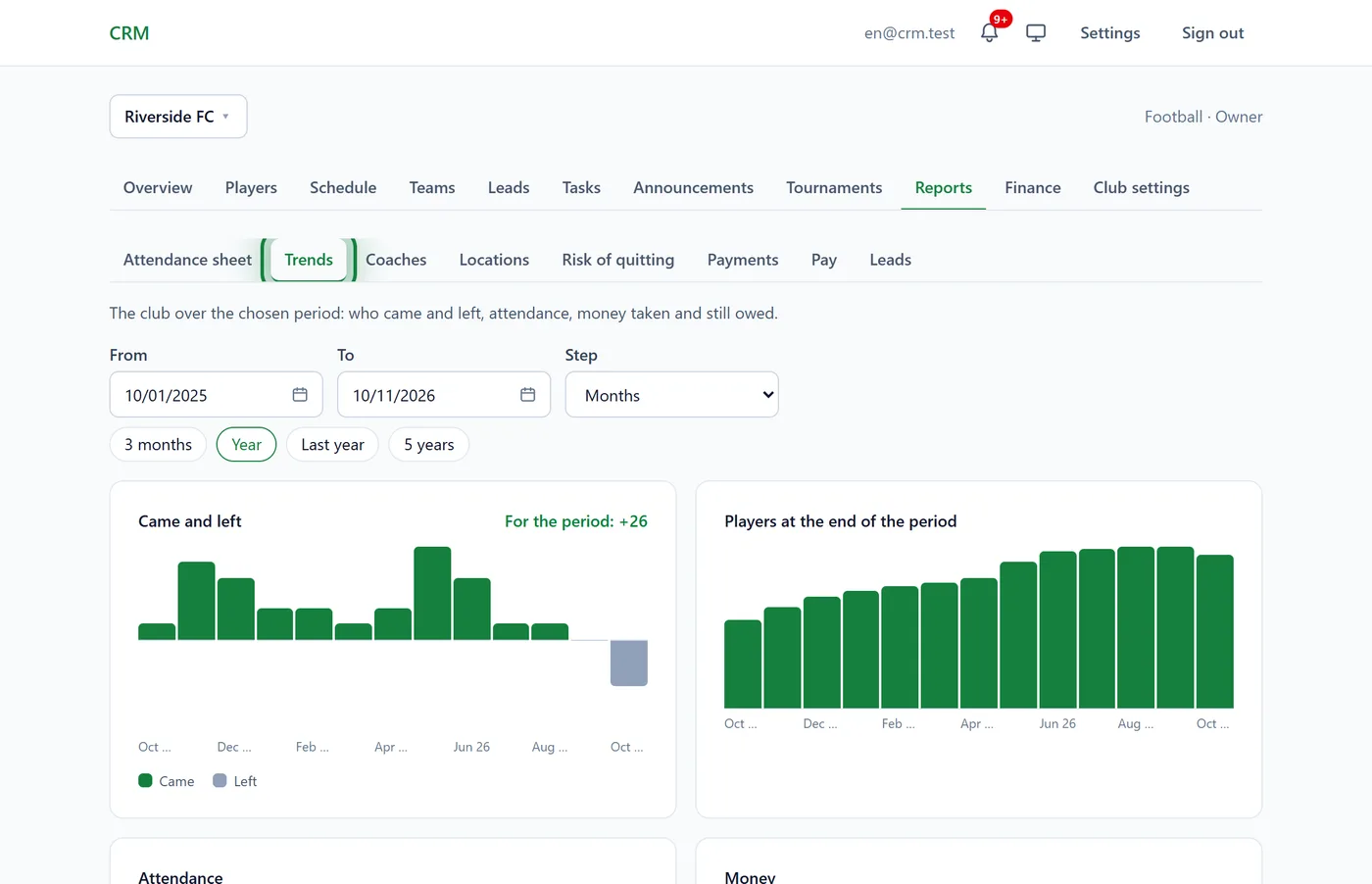
Read the charts:
- Came and left: how many players joined and how many left in each step, with For the period on top;
- Players at the end of the period: how the club grows;
- Attendance: the share of "In" and "Late" among all marks;
- Money: what was received, and hatched, what is still owed for subscriptions that started in the period. Only people who see the club's finances get this chart.
Under the charts, the same numbers as a table. Hover over a column for its exact value.
The other reports
- Attendance sheet: a team over a month, who came to which session (✓ present, L late, ✗ absent, E excused) and the month's rate.
- Coaches: how many sessions each coach held, cancelled and left unmarked, how often they stood in, and the attendance at their sessions.
- Locations: how each place is used: sessions, hours, visits, the busiest days and hours, and clashes where two teams are at the same place at the same time.
- Payments: the month's money by payment method, by who received it and by team.
- Pay: see Coach pay. Risk of quitting: see Churn risk.
- Leads: where leads come from and how many reach a trial and stay.
The Attendance sheet, Coaches, Locations, Payments and Pay go month by month with the ‹ › arrows and download with Export to Excel.
In the app
Menu → Reports: Attendance sheet, Coaches, Locations, Payments and Pay. Trends and the leads report are web only.
Tips
- Lots of "Not marked"? Ask the coaches to close their registers, or attendance and per-session pay come out too low.
- An attendance sheet for parents or a federation: Export to Excel and send the file.
- Compare one year with the next using Last year.
FAQ
It says "Too many columns for one chart"
The period is long and the step small, five years in weeks, say. Pick a shorter period or the Months or Years step.
Why can't I see the Payments tab?
The owner sees it, and support only if the owner allows it under Club settings → Access. Managers never see the club's finances: see Roles and permissions.
When does a player count as "Left"?
When they are archived. So archive players who stopped coming, or the trends will say the club never loses anyone.