 Sport CRM
For parents: what the portal shows
What parents see in the club's family portal (schedule, attendance, balance, announcements) and how to get notifications and fix their details.
Dla kogo: rodzice
The family portal is everything about your child at the club on one page. It works in the Sport CRM app and in a browser at app.sportcrm.app. Not signed in yet? Start with For parents: signing in.
My children
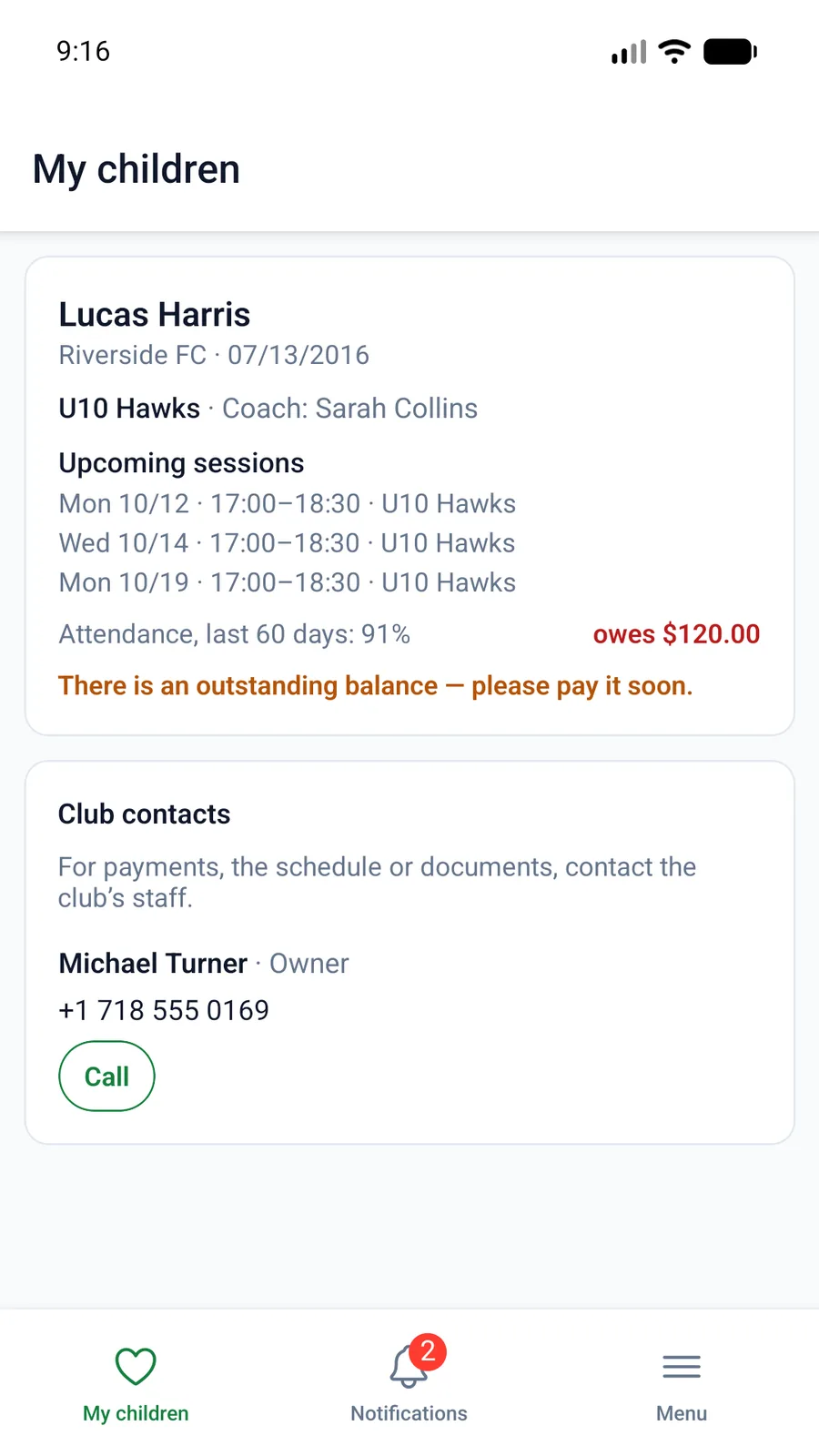
After signing in you land on My children, with a card for each child: the club, the team and its coaches, upcoming sessions, Attendance, last 60 days and the balance. Below are the Club contacts: who to ask about payments, the schedule or documents.
Click a card to open the child's page.
The child's page
- Upcoming sessions: date, time and place. Next to each, Coming or Not coming. "Not coming" opens a Reason field ("ill", "a school event"), and the coach sees it in the list.
- Call-up: if the coach has called your child up for a game, you see "Called up for the game" with the meeting time and place.
- Announcements: from the club, for the team or for a particular session.
- Balance: whether anything is owed or in credit, when the next payment is due, current subscriptions and the sessions left, and the Payment history. If the club takes payments online, the pay button is here.
- Attendance calendar: a week or a month: when the child came, was late or missed a session.
- Check-in QR: the code your child shows at the door. See QR check-in.
- What the club has on file: date of birth, when the medical certificate runs out, height and weight, and the fields the club shares with parents.
- Teams: the coaches with their phones, and the child's Other contacts.
Notifications
- The bell at the top (the Notifications tab in the app): sessions today and tomorrow, call-ups, announcements, amounts owed, a subscription ending, a medical certificate about to expire.
- Push notifications to your phone: in the app, Menu → Settings → Push notifications.
- Telegram reminders: Settings → Reminders in a messenger → Connect Telegram, then press "Start" in Telegram. Available when your club has turned it on.
- Calendar: Settings → Calendar → My children's sessions → Get a link, and the sessions show up in Google or Apple Calendar.
My contact details
On My children, click My contact details (or Settings → My details). Correct your phone or email and tick the messengers you really use. Every club you are a contact at sees the change.
FAQ
Children at different clubs: how do I switch?
You don't need to: My children shows every child from every club that has invited you, with the club's name under each child's name.
I don't see attendance or the QR code
The club doesn't keep attendance, so those blocks are hidden.
The amount owed looks wrong
Check the Payment history and the subscriptions. If a payment is missing, contact the club (Club contacts): the club corrects the balance.